002 Internship

FeedbackNow

Designing dashboards that tell compelling stories

Timeline 8 weeks, Summer 2024
Team Steven Peltzman (CEO), Amisha Jaggi (Designer)
My Role Product Design, Data Visualization
Tools Figma, Adobe Creative

Sales teams had 20 minutes to show how customer feedback becomes action. The dashboard wasn't helping.

FeedbackNow's B2B dashboard was cluttered, lacked hierarchy, and made it difficult for potential clients to quickly grasp how user feedback translated into actionable insights.

During my internship, I worked closely with CEO Steven Peltzman and designer Amisha Jaggi to redesign the dashboard not just for end users, but for the sales context where its story needed to be told.

The Problem

I sat in on sales demos and watched the struggle. Sales teams would jump between sections, trying to explain metrics while clients looked confused. The interface fought against the story they were trying to tell.

Charts competed for attention. Key insights were buried. Navigation assumed familiarity the prospects didn't have yet.

"I lose them in the first 5 minutes"

Sales rep describing typical demo experience

"Where do I even start?"

Common client reaction to dashboard density

"Can you show me what matters?"

What prospects actually wanted to see

The challenge wasn't just redesigning a dashboard. It was designing for the moment of persuasion

I needed to understand not just what the dashboard showed, but how it needed to convince.

Research Phase

From signal to action

Instead of treating the dashboard like a reporting tool, I mapped the narrative sales teams needed to tell during demos: physical signalsplatform insightreal-time response.

Step 01

Where signals begin

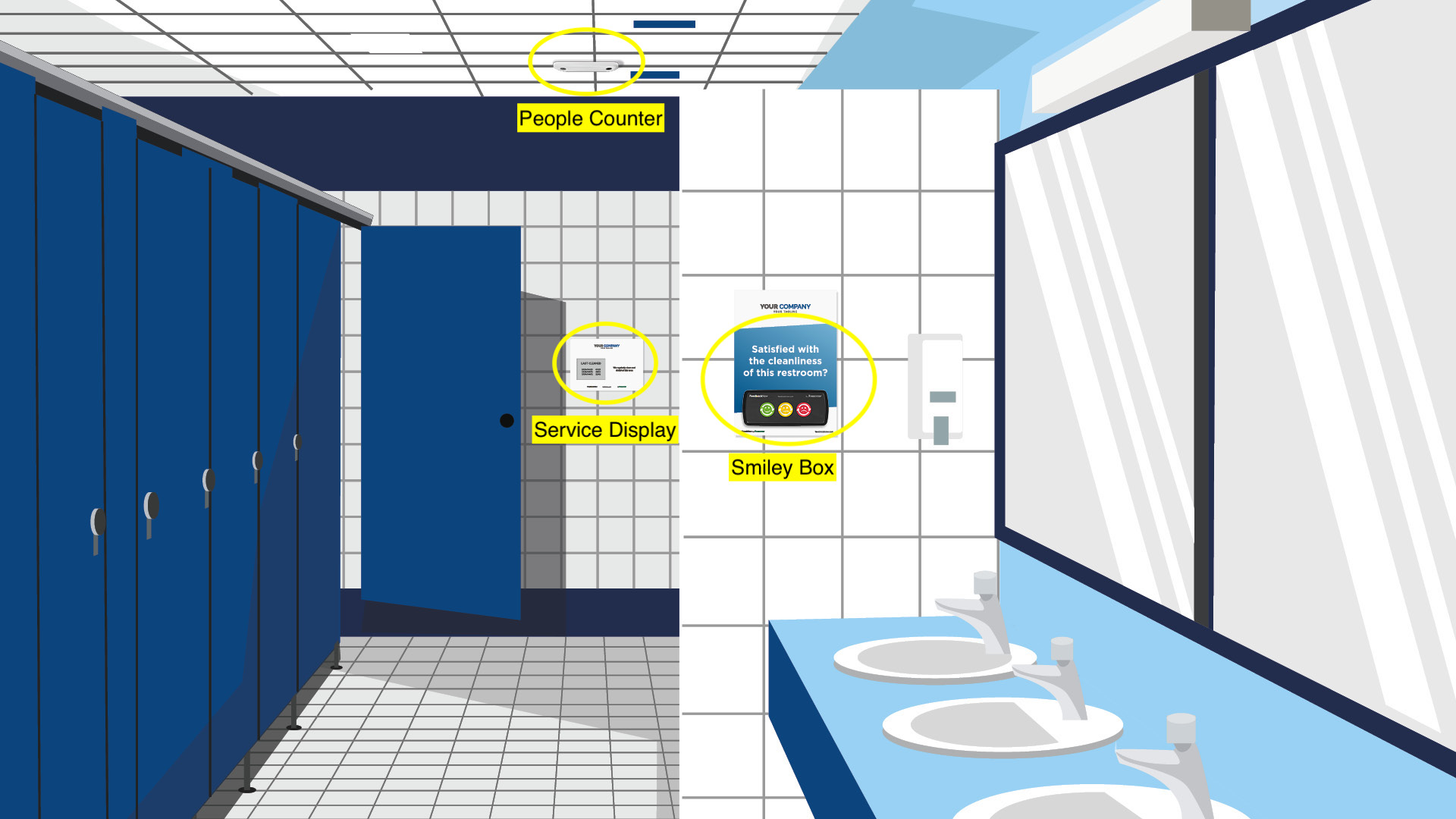
Customer experience issues start in physical spaces. I defined “signal hotspots” (lobby, conference rooms, restrooms) to ground the story in the real world and give demos a clear starting point.

Step 02

How signals are captured

Frictionless sensors capture sentiment, time, and location so teams can quickly answer: what happened, where, and when.

Step 03

Turning signals into insight

Captured signals roll up into readable metrics that support a demo narrative. The goal wasn’t “more charts”, it was clear evidence that connects feedback to decisions.

Step 04

The action moment

Alerts trigger when thresholds are crossed, turning the dashboard into an operations tool—not just a report. This “moment of action” became a key beat for sales demos and later shaped the guided walkthrough mode.

This narrative framing became the foundation for the redesigned hierarchy and the guided walkthrough mode.

Annotated diagram showing physical feedback devices feeding into the FeedbackNow system

Physical signals are intentionally structured so they can be surfaced in dashboards and escalated as alerts without requiring interpretation during a live demo.

Establishing Hierarchy

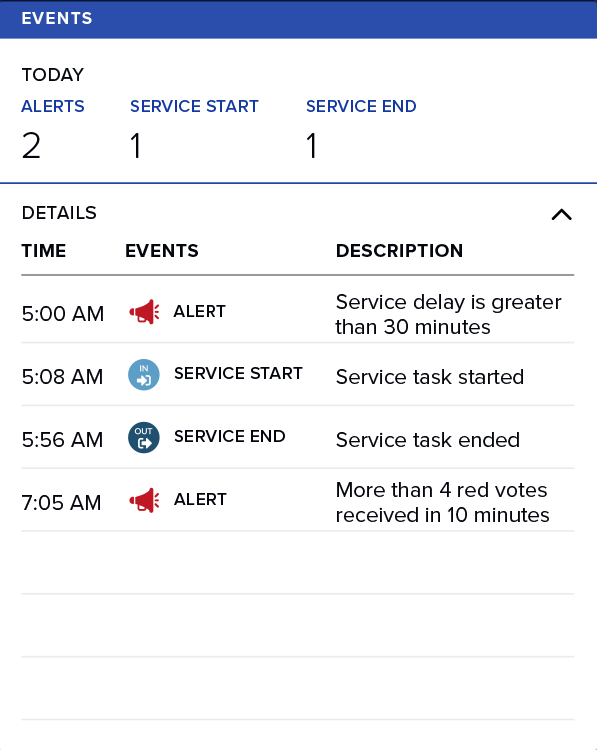
The redesign centered on one principle: lead with what matters during a live demo. I prioritized alerts and critical events at the top of the experience, then organized the rest as supporting context.

This card is a hierarchy test: summary first (Today’s counts), then details (timeline), with visual emphasis on urgency so sales reps can narrate without hunting.

  • Primary: Alerts + event type (fast “what happened?”)
  • Secondary: Time + description (fast “when + why?”)
  • Tertiary: Service start/end (context, not noise)
Hierarchy study: events card prioritizing alerts, then timeline details

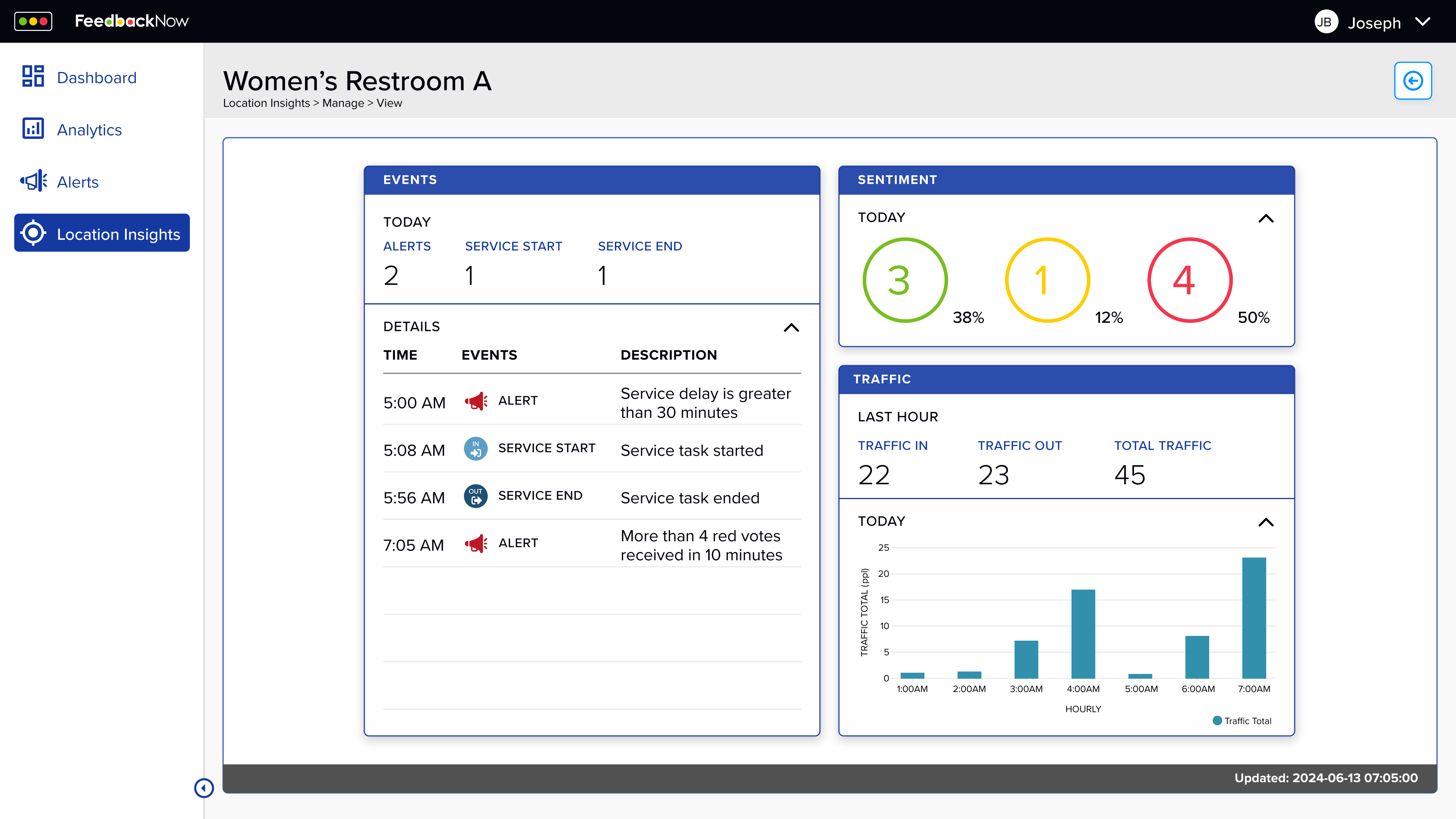
Real-time alert escalation delivered directly to teams when thresholds are crossed.

Sentiment distribution designed for instant readability during live demos.

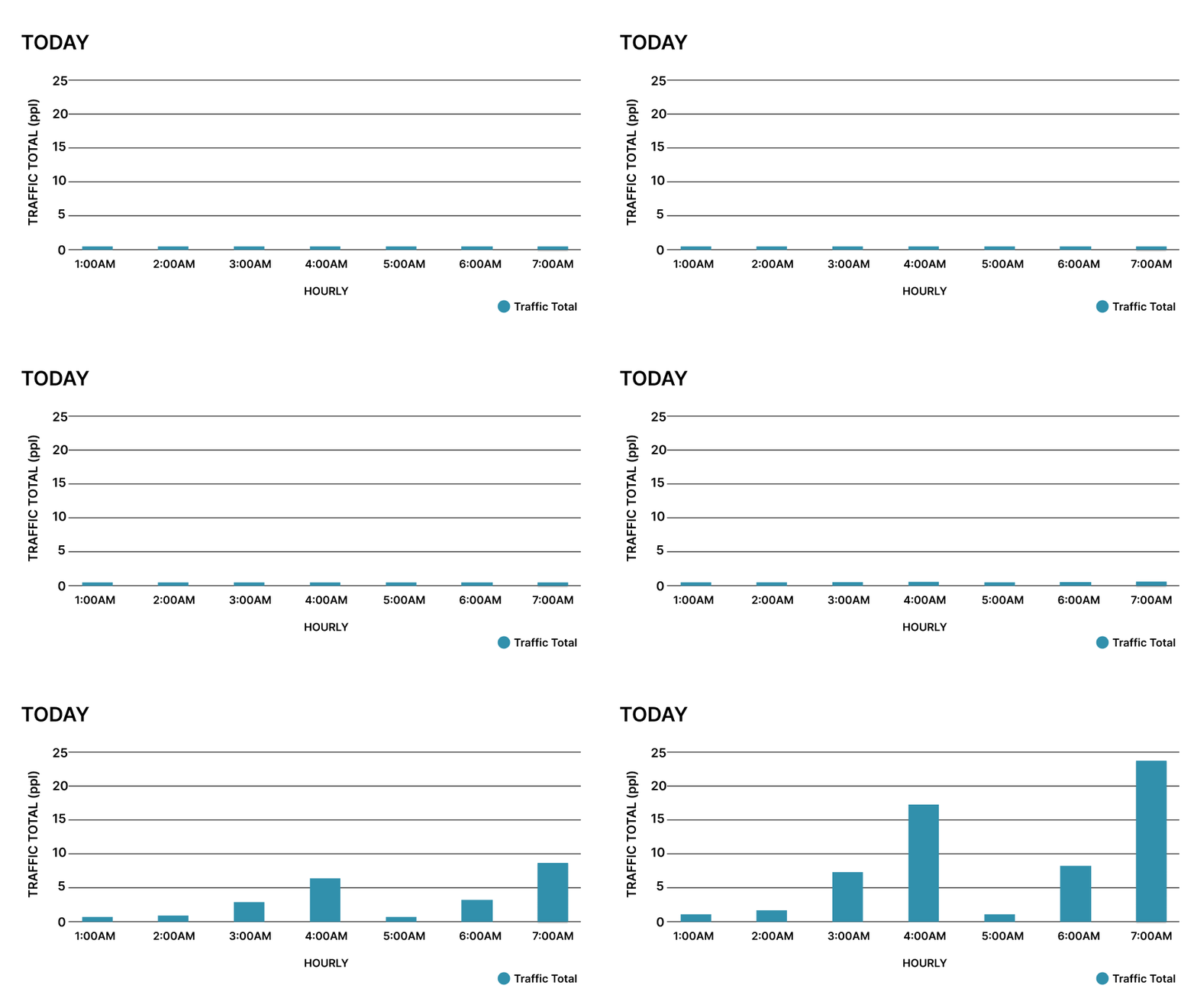
Hourly traffic bar chart animation

Hourly traffic patterns reveal usage spikes and service gaps over time.

Building context where feedback signals originate

Physical environments where feedback signals originate, grounding the system in real space.

"Now I can walk through a demo without losing the narrative. The design does half the selling for me."

— Sales team member after using redesigned dashboard

Guided Walkthrough Mode

Rather than creating a rigid presentation mode, I designed the dashboard to support a guided walkthrough that sales teams could control in real time.

Alerts anchor the story, summaries establish context, and deeper metrics remain available without interrupting the narrative. Sales reps can move linearly when needed, or pivot based on client questions.

This approach transformed the dashboard from a tool you navigate into a story you tell.

Impact & Results

The redesigned dashboard gave sales teams a clear, compelling way to demonstrate value. Stakeholder feedback confirmed the design made pitches more persuasive and client-focused.

67% Increase in stakeholder satisfaction with demo flow
5min Faster time to communicate core value proposition
100% Of sales team adopted new guided mode

What This Taught Me

This project fundamentally changed how I think about context in design. I learned that great B2B products aren't just designed for end users. They're designed for the moments when someone needs to convince others of their value.

Working with Steven and Amisha taught me the importance of designing for the narrative, not just the interface. The dashboard needed to be both a tool and a story. That tension between flexibility and guidance, between exploration and persuasion is where the most interesting design problems live.

Most importantly, I learned that design directly influences business outcomes. By understanding sales team needs, I could create something that didn't just look better, it performed better where it mattered most.
This internship showed me how thoughtful design can shape compelling narratives, make complex information feel simple, and directly influence business outcomes.

It reinforced my belief that great design is as much about storytelling as it is about usability—especially in B2B contexts where the product needs to sell itself before anyone can use it.

Next Project Faith Hill Community Analysis All Projects